GHOST 2.8 - 5.6
Discounted price for professionals — Free B2B quote within 24h
Category: LED Screen Indoor
Pitch : 2.8 mm
Product images
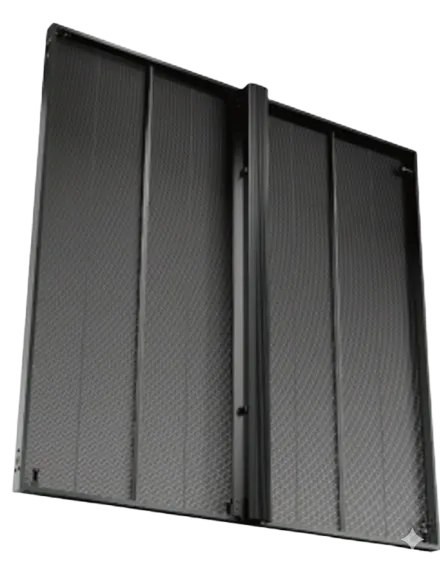

Description
The GHOST 2.8 – 5.6 crosses the 60 % transparency threshold: more than half the surface is empty. From that level you no longer sense what is behind the screen — you recognise it. This is the model for projects where the facade, window or stage must remain legible through the image.
Two pitches, a strip geometry
The double figure describes the construction. The LEDs sit on horizontal strips: tight along the strip, spaced between strips. That vertical spacing is what creates the transparency.
A one-metre panel therefore carries 352 × 176 pixels — twice as many dots across as down, for 61,952 pixels per square metre. The pixel is not square, and content produced outside that ratio will be distorted.
Distance is calculated on the vertical spacing
This is the most common mistake with this type of panel. It is not the 2.8 mm in the name that sets the minimum viewing distance, but the gap between two strips. Allow a comfort distance of about 9.8 metres and full resolution at 19.5 metres. Below ten metres the eye separates the horizontal lines and the image reads like a luminous blind.
Construction
SMD1921 LEDs, 500 × 125 mm modules, 11 scan, 3,840 Hz refresh, 140° / 140° angle, 5,000 nits, 10 kg per square metre, consumption 240 W/m² average against an 800 W/m² peak, aluminium frame with front maintenance, −20 to +60 °C range.
A larger package, deliberately
Where the dense models use SMD1415, this one moves to SMD1921, a 1.9 × 2.1 mm package. That is not a compromise: with strips further apart, the package can grow without costing transparency, and a larger package houses larger dies, hence more output per dot. That is what sustains 5,000 nits while occupying only 40 % of the surface.
Position in the range
The GHOST 3.9 – 7.8 pushes transparency to 75 % and drops to 8.1 kg per square metre, for viewing beyond thirteen metres. Conversely, if the viewing distance is under ten metres, the GHOST 3.9 and its square 50 % grid will read better.
Technical Expertise
Cabling a large transparent facade
At 61,952 pixels per square metre, a standard receiving card — around 655,000 pixels — covers nearly ten square metres. That is a lot, and it changes the method compared with a dense wall.
On a 60 m² facade you are therefore looking at six or seven cards, spread over as many Ethernet chains. Three points to settle on the drawing before installation:
Chaining direction. A facade is cabled in columns or in rows, never in a serpentine improvised on site. The chaining plan is drawn with the layout, not afterwards.
Cumulative length. Beyond about a hundred metres of copper between controller and last panel, an optical link becomes necessary. On a tall facade, the vertical climb alone eats half the budget.
Controller placement. Putting it at the centre of the facade rather than at one end halves the maximum chain length. It is free, and it avoids the delayed drop-outs that appear after a year once connectors have aged.
Sixty per cent: what the threshold really changes
Between 50 % and 60 % transparency the gap looks small. In use it shifts what the product is. At 50 % you perceive there is something behind; at 60 % you identify what it is — a perspective, a window display, a set, a face.
The selection criterion is therefore not aesthetic but functional: is there something behind the screen that must stay recognisable? If the screen stands in front of a solid wall or neutral background, those extra ten points go unseen and cost a quarter of the resolution. If it stands in front of a stage, a display or a glazed facade, they are the whole project.
Content must be produced at the exact resolution
A 352 × 176 pixel grid is filled by no standard format. Three rules follow, to be set at briefing and not at delivery.
Produce at the native resolution of the complete surface — not cropped 16:9, not rescaled Full HD. Any resampling on so coarse a grid destroys fine strokes.
Avoid one-pixel horizontal strokes. On a strip geometry a thin line falls on a strip or between two: it doubles in thickness or vanishes. Vertical strokes are safe.
Compose on black. A black pixel does not emit and lets you see through: that is where the effect happens, and it is also what keeps consumption at 240 W/m² instead of 800.
Sizing the controller
At 61,952 pixels per square metre, a VX400 Pro covers 41 m², a VX600 Pro 62 m², a VX1000 Pro 104 m². An all-in-one therefore covers almost every existing transparent facade. Our resolution calculator returns the exact figure.
Use Cases
Glazed building facade — read from the street at ten metres and beyond, with the architecture still legible through it. This is where 60 % is fully justified.
Stage set and studio backdrop — the screen lets performers, set or lighting show through, often the intended effect rather than a solid background.
Atrium glazing and light well — large overhead surface, read from a distance, without darkening the space below.
Double-height flagship window — passers-by see the shop interior through the image, from about ten metres back.
Structure cladding and mediatecture — an image carried by an existing frame, where the screen must disappear by day.
Technical Tips
Calculate viewing distance on the vertical spacing, not the stated 2.8 mm. That is close to ten metres of comfort, not five. It is the most common mistake with this type of panel.
Produce content at native resolution, never cropped 16:9. The grid is not square: 352 dots across to 176 down per panel.
Avoid one-pixel horizontal strokes. On a strip geometry they double in thickness or vanish; vertical strokes pass without trouble.
Draw the chaining plan with the layout. One receiving card covers ten square metres at this density: the split is settled on the drawing, not on site.
Place the controller at the centre of the facade. That halves the maximum chain length and avoids the drop-outs that appear after a year.
Only take this model if there is something behind it. In front of a solid wall the extra ten points of transparency go unseen and cost a quarter of the resolution.
Technical Specifications
| Specification | Value |
|---|---|
| Pitch | 2.8 mm |
| Brightness | 5000 nits |
| Refresh Rate | 3840 Hz |
| Module Size | 500 x 125 mm |
| Panel Resolution | 352 x 176 |
| Dimensions (W×H×D) | 1000×1000×? mm |
| Panel Weight | 10 kg |
| LED Type | SMD1921 |
| Viewing Angle | 140°/140° |
| LED Lifespan | 100 000 heures |
| Color Temperature | 6500k |
| Operating Temperature | -20 °C à +60 °C, 10 % à 90 % HR |
Frequently Asked Questions
À quelle distance peut-on regarder un écran LED pitch 2.8mm ?
Pour un confort visuel optimal avec un pitch de 2.8mm, la distance de recul recommandée est d'environ 3 mètres. Cela permet à l'œil humain de ne plus distinguer les pixels et de profiter d'une image parfaitement nette.
Quels sont les avantages d'un écran LED intérieur ?
Les écrans LED indoor offrent une luminosité supérieure aux écrans LCD classiques et une absence totale de bordures entre les modules. Ils garantissent un affichage dynamique percutant même en plein jour dans des environnements très éclairés.
Comment installer un écran LED géant GHOST 2.8 - 5.6 ?
L'installation du GHOST 2.8 - 5.6 est conçue pour être flexible, permettant des configurations créatives et sur-mesure. Nos techniciens PIXELIGHT assurent le montage sur structure porteuse ou murale avec un calibrage précis de chaque module.
Quelle est la durée de vie d'un écran LED professionnel ?
Un écran LED professionnel de haute qualité a une durée de vie estimée à environ 100 000 heures d'utilisation. Cette longévité est soutenue par la possibilité de remplacer individuellement chaque module LED en cas de besoin.
Quel prix pour un écran LED pitch 2.8 - 5.6mm ?
Le prix d'un mur LED dépend de la surface totale, de la résolution choisie et de la complexité de l'installation. Contactez PIXELIGHT pour un devis personnalisé adapté à votre projet d'affichage dynamique professionnel.